Vector by datahog - Vendor neutral log pipeline manager
Collect, transform, and route all your logs and metrics with one simple tool.
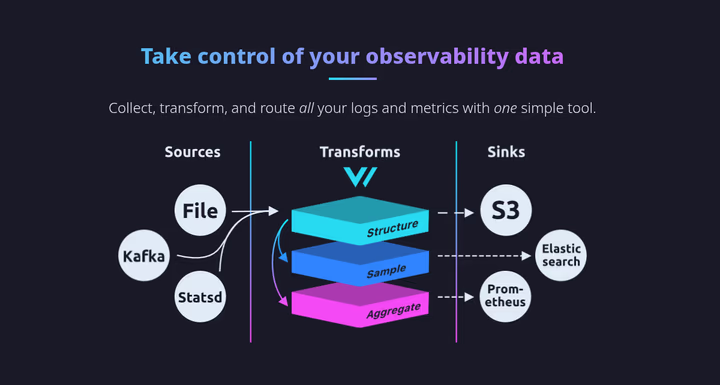
Capable to collect transform and push to multiple destination, Vendor neutral and lock-in free Built in Rust so memory efficient and safe. **Single binary X86_64, ARM64/v7 *No runtime
CODE
curl --proto '=https' --tlsv1.2 -sSfL https://sh.vector.dev | bash
wget https://packages.timber.io/vector/0.38.0/vector-amd64.deb
bash -c "$(curl -L https://setup.vector.dev)" && apt-get install vector #
vector validate /etc/vector/vector.yaml  # /root/.vector/config/vector.yaml
vector test /etc/vector/vector.yaml
# Dry run (process but don't send)
vector --config /etc/vector/vector.yaml --dry-run

# Check Vector metrics
curl http://localhost:9598/metrics
/etc/vector/vector.yaml
CODE
sources:
  vector_metrics:
    type: internal_metrics
    scrape_interval_secs: 15

   # Host metrics (CPU, memory, disk, network)
  host_metrics:
    type: host_metrics
    collectors:
      - cpu
      - disk
      - filesystem
      - load
      - host
      - memory
      - network
    scrape_interval_secs: 15

  # Systemd service metrics
  systemd_metrics:
    type: systemd_metrics
    scrape_interval_secs: 30

  # Process metrics (like ps/top)
  process_metrics:
    type: internal_metrics
    scrape_interval_secs: 15

  syslog:
    type: file
    include:
      - "/var/log/syslog"
      - "/var/log/auth.log"
    read_from: beginning

  nginx:
    type: file
    include:
      - "/var/log/nginx/*.log"
    read_from: beginning

transforms:
  # Add custom tags/labels
  add_tags:
    type: add_fields
    inputs: ["host_metrics", "systemd_metrics", "process_metrics"]
    fields:
      environment: "production"
      region: "us-east-1"
      collector: "vector"

sinks:
  loki:
    type: loki
    inputs: ["syslog", "nginx"]
    endpoint: "http://your-loki-server:3100"
    labels:
      host: "{{ host }}"
      job: "vector"
    encoding:
      codec: json
    tls:
      ca_file: /etc/vector/certs/ca.crt
      crt_file: /etc/vector/certs/vector.crt
      key_file: /etc/vector/certs/vector.key
      verify_certificate: true
      verify_hostname: true

  elasticsearch:
    type: elasticsearch
    inputs: ["app_logs"]
    endpoint: "http://elasticsearch:9200"
    index: "app-logs-%Y-%m-%d"

  s3:
    type: aws_s3
    inputs: ["app_logs"]
    bucket: "my-logs-bucket"
    key_prefix: "logs/"

  # Optional: Also output to console for debugging
  console:
    type: console
    inputs: ["syslog"]
    encoding:
      codec: json
# Vector's GraphQL API (disabled by default)
# Uncomment to try it out with the `vector top` command or
# in your browser at http://localhost:8686
# api:
#   enabled: true
#   address: "127.0.0.1:8686"
Use Systemd to manage vector
CODE
# Vector is automatically installed as a systemd service
systemctl start vector
systemctl enable vector
systemctl status vector

# View logs
journalctl -u vector -f
Configuration Directory
CODE
# Main config
/etc/vector/vector.yaml

# Config directory (for multiple config files)
/etc/vector/vector.d/

# Data directory
/var/lib/vector/

# Logs
journalctl -u vector
S
SUVANKAR SARKAR
Engineering, systems programming, and curated technology insights.